 Here's another great feature of iTunes 9 and iPhone OS 3.1: Genius Mixes.
If you want this feature on your iPhone, you'll have to start with creating the mixes on iTunes first.
When I updated iTunes to version 9, it didn't create Genius Mixes for me automatically. I had the Genius turned on before the update and it was the same after the update - no Genius Mixes.
So, what I had to do was disable the Genius first and then renable it. That allowed the Genius Mixes to come out. What iTunes does to create mixes is look at your entire iTunes library and create playlists of the different genres you already have. It also should be picking songs that are similar to each other. I haven't listened to each mix to really test that out. But, so far it seems to be pretty good.
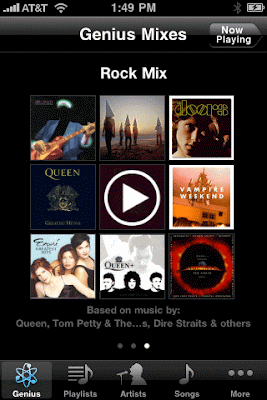

Now, to get the mixes on your iPhone is easy. All you have to do is sync it to your iPhone like a playlist. I suppose you also have to enable Genius on your iPhone, which I already did when turning on the Genius for apps.
Just to let you know, one of the funky things my iPhone does is that it doesn't always display the correct album cover for each song. I hope that can get resolved eventually. So, in the picture to the right Expose isn't really in this rock mix.
I'm really going to test out this feature when I go on my trip this Friday.


 Store kept saying it didn't have enough space. So, I deleted "The Matrix" off my phone. The maps are within the app itself (unlike other apps which get their maps through an internet connection) so that's why the size of the app is huge. Those who have a 32GB iPhone will definitely benefit from the extra space. Now, this app doesn't ACTUALLY work. It's only a demonstration. You can type in an address and it will simulate how it will guide you from the last location it left off from. You can choose a 3D or 2D map. You also have the option to show street names and there's a night mode so it's easier to see the screen at night. From what I can tell, it's a good app but I won't definitely know until I can try the real app. It's not out yet but its European counterpart is selling for $139.99. And that's cheap compared with actually getting a real GPS system.
